
iOS and Android — free
Read isiZulu.
Tap what you don't know.
Real news and stories, written for isiZulu readers. Tap any word for its meaning, save it, and Lindy schedules the reviews that make it stick.
Also reads isiXhosa, Afrikaans, Sesotho and chiShona.
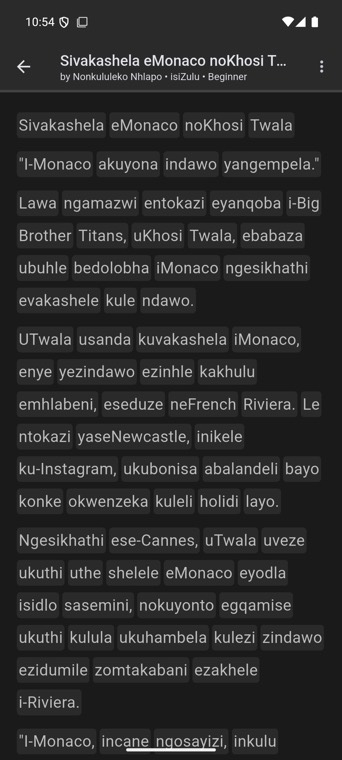
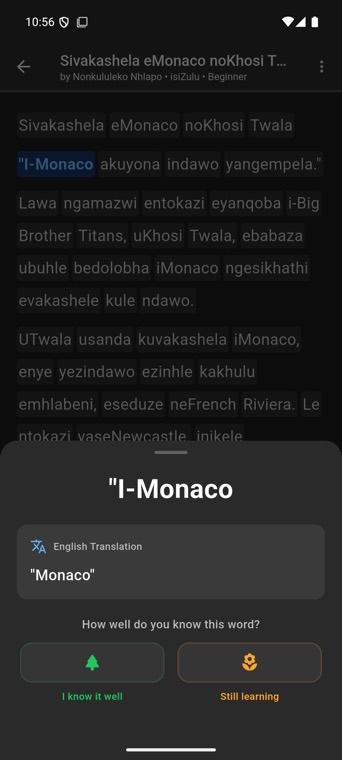
Three taps from reading to remembering
No flashcard decks to build, no word lists to type. The article is the lesson.
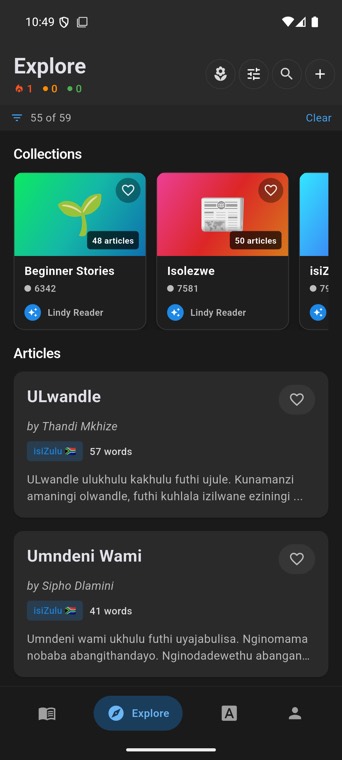
Open something worth reading
Isolezwe news, Nal'ibali stories, or your own — paste a text or import a YouTube video with isiZulu captions and read along with the sound.
Tap a word, keep reading
See the meaning, hear it said, and mark it still learning or known. Long-press for the whole sentence.
Reviews come to you
Spaced repetition decides when each word is due. A few minutes a day, only the words you actually met in what you read.
Read what South Africa reads
Textbook dialogues teach textbook isiZulu. Lindy's shelf is the news people argue about and the stories children grow up on — graded by length so you can start small.
Free.
Every article, every tap, every review. No daily cap on learning and no word limit. Sign in to keep your words across devices.
Store links go live once the app clears review.
Questions
Anything else — info@lindyreader.app
Which languages can I read?
isiZulu has the biggest shelf today. isiXhosa, Afrikaans, Sesotho and chiShona work the same way, with more content on the way.
Do I need an account?
Not to start. Open the app and read. A free account keeps your words, streak and progress in sync if you switch phones.
Can I add my own articles?
Yes — paste any text, or import a YouTube video that has isiZulu captions and the words light up as the video plays. Imports stay private to you.
Where do the translations come from?
Machine translation, shown as a learning aid rather than a dictionary entry. Long-press a sentence when a single word isn't enough.
How do I delete my account?
Profile → Delete account. Your words, progress and profile are removed. Details are in the privacy policy.